
What credits are
Credits are a balance the customer can spend at checkout in place of card payment. They typically come from:
- A cancelled booking refunded as credit (rather than back to card)
- An admin-issued credit note (e.g. as a gesture after a class issue)
- A pre-paid top-up if your studio sells credit packs
Each credit has its own voucher code and an expiry date.
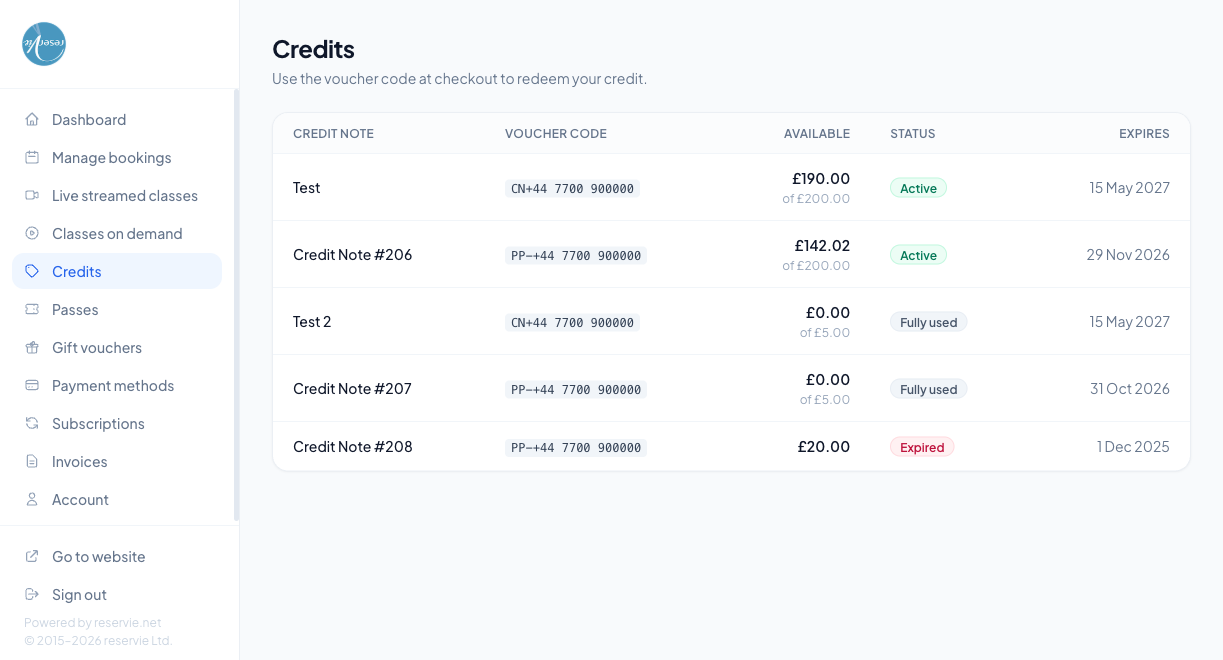
What the table shows
| Column | Notes |
|---|---|
| Credit Note | The name or reference of the credit. Customer-issued credits use the name set when the credit was created; auto-generated ones from cancellations are labelled e.g. Credit Note #206 |
| Voucher Code | The code the customer enters at checkout. Treat this as sensitive — anyone with the code could redeem the credit |
| Available | The current balance and the original face value, e.g. £190.00 of £200.00 |
| Status | Active, Fully used, or Expired |
| Expires | Date after which the code stops working. Unused credit on an expired note is lost |
Redeeming a credit
At checkout the customer pastes the voucher code into the Promo / voucher code field. The credit is applied against the booking total — partial use is allowed, with any unused balance staying on the credit for later.
If the credit’s value exceeds the booking total, the difference stays on the credit. If the booking total exceeds the credit value, the customer pays the difference via card.
Common scenarios
”I cancelled a booking and was told I got credit, but I can’t find the code.”
It’s listed here as a Credit Note. The voucher code is the code starting CN-... (auto-generated cancellations) or PP-... (partial-payment credits).
”My credit expired before I could use it.”
Expired credits are non-recoverable from the portal. If you want to extend the expiry as a goodwill gesture, you can do that from admin Customer Manager → (customer) → Credits.
”I have a Fully used credit — what does that mean?”
The customer spent all of it. The line stays in the table for reference but the code no longer redeems.
Where to go next
- Managing Bookings — where cancellation-to-credit refunds originate
- Gift Vouchers — a separate balance customers can receive as a gift