
What gift vouchers are
Gift vouchers are a balance one customer buys for another. The buyer pays for it; the recipient receives a code they can redeem at checkout for any of your products (passes, individual class bookings, video purchases, depending on what the voucher template covers).
This page has two tabs:
- Received — vouchers other people have bought for the signed-in customer
- Purchased — vouchers the signed-in customer bought for other people
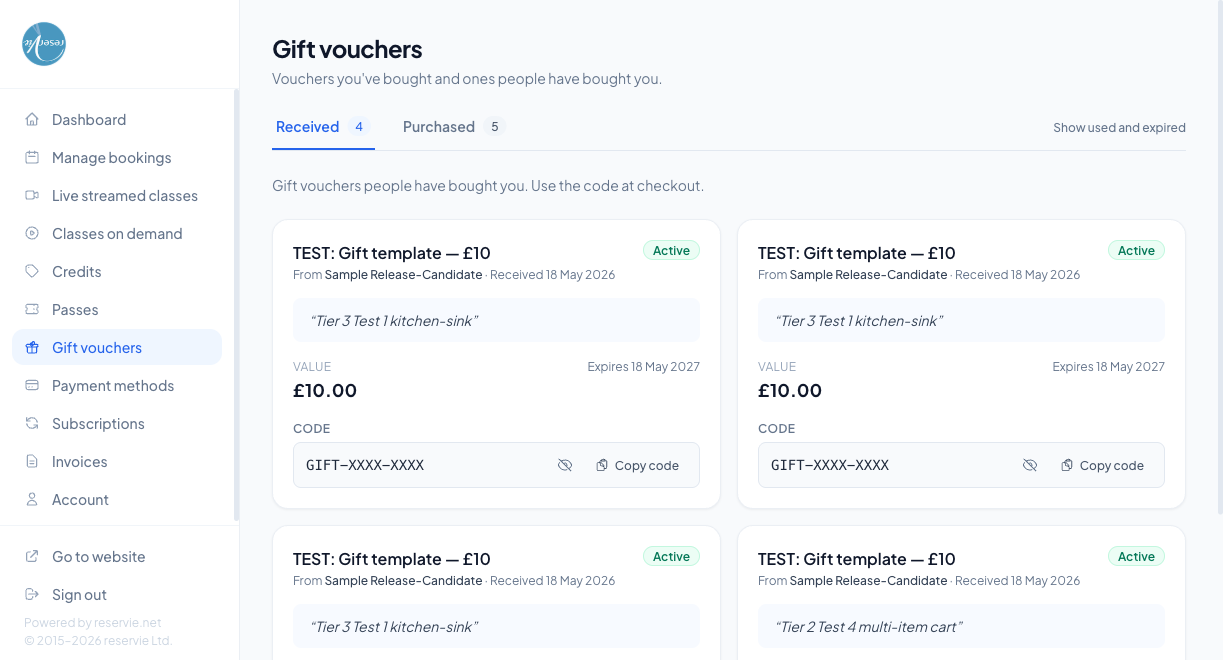
What each voucher card shows
| Element | What it is |
|---|---|
| Template name | The voucher template the buyer chose (e.g. Studio Gift — £25) |
| From line | Name of the person who bought the voucher and the date it was received |
| Status | Active, Used, or Expired |
| Personal message | The note the buyer typed at checkout, in quotation marks |
| Value | The voucher’s monetary value |
| Expires | Expiry date — after this the code stops working |
| Code | The redemption code, hidden by default. Show, Hide, and Copy code buttons let the customer reveal it when needed. Treat the code as sensitive — anyone with the code can redeem it |
Redeeming a voucher
The customer copies the code from this page, then pastes it into the Promo / voucher code field at checkout. The voucher’s value is applied against the booking total. Partial use is allowed — any unused balance stays on the voucher until expiry.
The “Show used and expired” toggle
By default the Received tab only lists Active vouchers. Toggling Show used and expired reveals fully-used and expired ones, so the customer can look up an old code or value for their records.
The Purchased tab
This tab lists the vouchers the customer has bought to give to other people. Useful for:
- Reminding themselves what they bought as a present
- Re-sending the email if the recipient lost it
- Cancelling / refunding (if your studio’s policy allows that)
Common scenarios
”I was sent a voucher but it’s not showing here.”
The voucher is keyed to the email address of the recipient. If the buyer typed the wrong email at checkout, it’ll be in someone else’s account (or no account at all). Check Customer Manager → Gift Vouchers in admin to find it, and re-issue if needed.
”My voucher code says invalid at checkout.”
Likely one of:
- The voucher is expired (check the Expires date on this page)
- The voucher is for a different studio (codes don’t cross studios)
- A typo / extra space when copying — use the Copy code button
”Can the voucher be split across multiple bookings?”
Yes — any unused balance stays on the voucher after each partial redemption.
Where to go next
- Credits — a separate kind of balance, issued by your studio rather than gifted
- Managing Bookings