
What passes are
Passes are pre-purchased bundles of class credits. A pass typically covers a fixed number of classes (e.g. “10-class pass”) or unlimited classes within a period (e.g. “Monthly Gold member”). They’re configured on the admin side under Passes.
Each pass on this page is a separate purchase — a customer can have multiple passes active at once, and Reservie chooses which one to spend against each booking based on rules you set at the pass level (oldest-first by default).
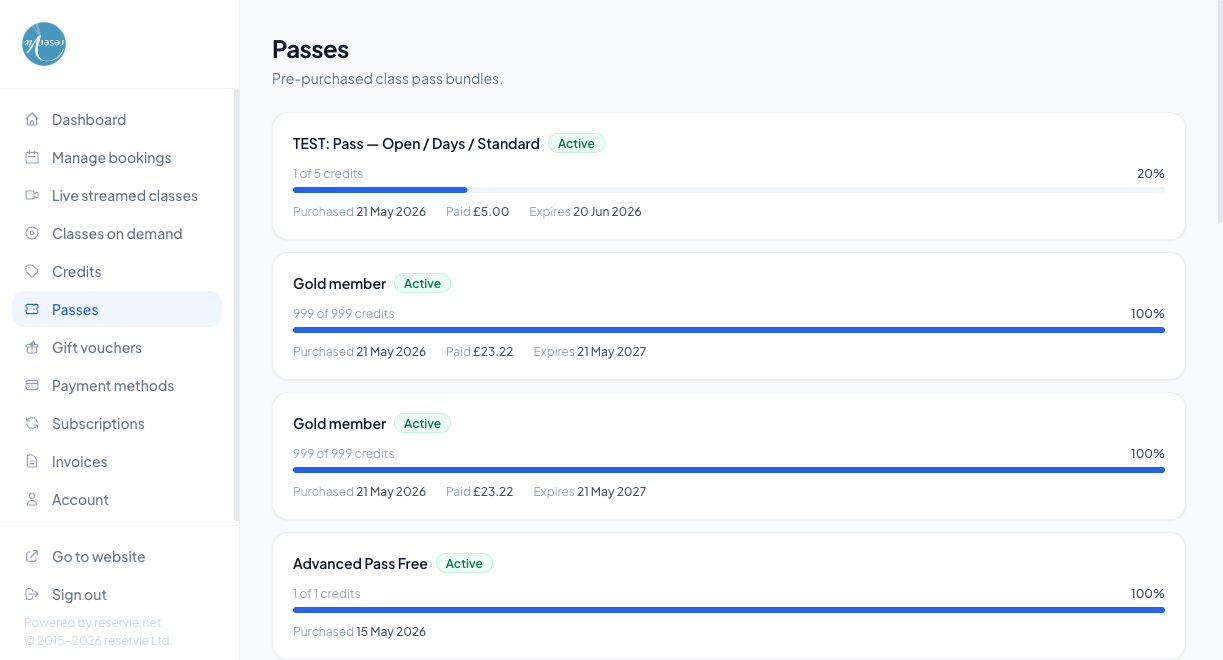
What each card shows
| Element | What it is |
|---|---|
| Pass name | The pass product the customer bought |
| Status badge | Active, Used up, or Expired |
| Credits remaining | E.g. 5 of 10 credits, 1 of 1 credits, 999 of 999 credits (the right-hand number is the pass’s original capacity) |
| Progress bar / percentage | Visual indicator of how much of the pass has been used |
| Purchased | The date of purchase |
| Paid | What the customer paid for the pass |
| Expires | The expiry date — after this date the pass is no longer usable even if credits remain |
How passes get spent
When a customer books a class:
- Reservie looks at the customer’s active passes
- Picks the one that’s valid for that class (some passes are restricted to specific events / categories)
- Deducts one credit from that pass
The booking on the Managing Bookings page shows the cost as e.g. 1.00 CR to indicate it was paid by pass.
”Active” vs “Used up” vs “Expired”
- Active — has remaining credits and is within its validity window
- Used up — credits have been fully used; expiry not yet reached
- Expired — past expiry, regardless of remaining credits. Expired credits are forfeit unless you extend the expiry from admin
Common scenarios
”I have an Active pass but it’s not being used for my booking.”
Most common causes:
- The pass is restricted to a category / event type that doesn’t match the class being booked
- Another pass exists with a higher priority for that event
- The pass hasn’t yet started (some passes have a start date as well as an expiry)
Check the pass’s configuration in admin Passes → (pass) to see its restrictions.
”I bought a monthly pass — when does it renew?”
Renewals happen via subscriptions, not the pass record. See Subscriptions. A monthly pass is typically the result of an active subscription — when the subscription renews, a new pass is issued for the next month.
”Can I gift my pass to someone else?”
Passes are non-transferable. If you want to do this for a customer as a one-off, you can issue them a credit note (or a gift voucher) instead — see Credits and Gift Vouchers.
Where to go next
- Managing Bookings — pass-paid bookings show as X.XX CR cost
- Subscriptions — recurring passes are issued by subscriptions
- Admin: Passes overview