
What this page is for
Account is where the customer edits their personal details — what gets used to address them in emails, what appears next to their bookings on your admin side, and what email address their notifications go to.
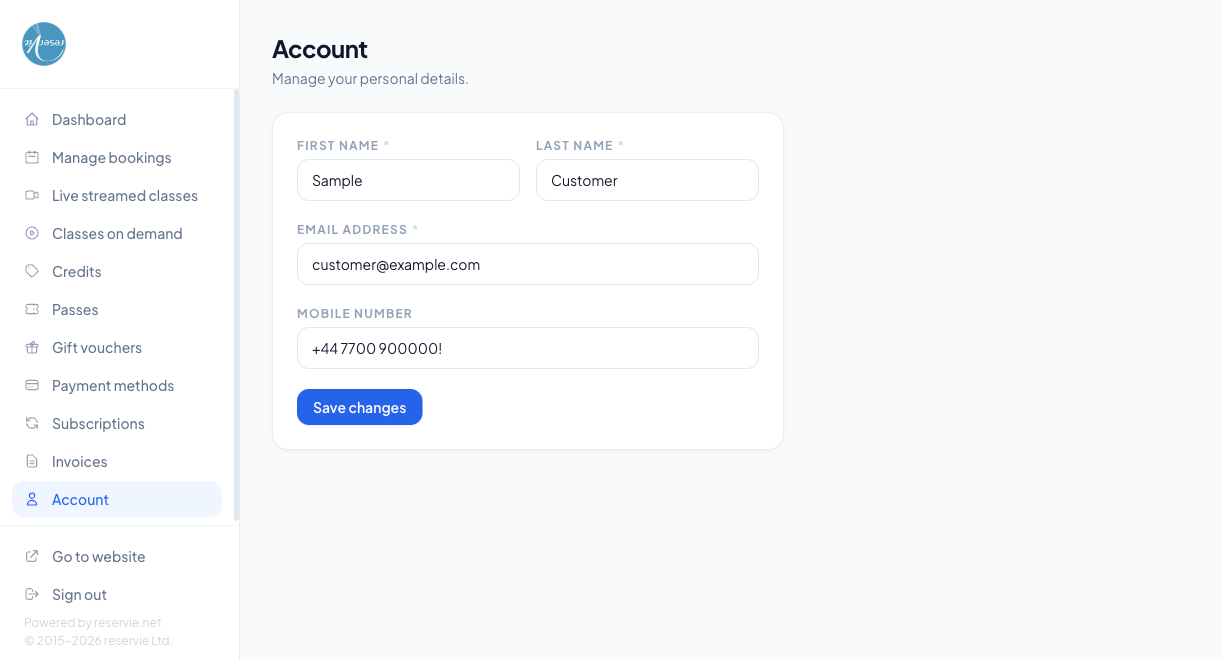
The fields
| Field | Required | Notes |
|---|---|---|
| First name | Yes | Appears in confirmation emails and on the admin Customer Manager record |
| Last name | Yes | Same — used in salutations and registers |
| Email address | Yes | The address the customer signs in with and where notifications go. Changing this changes the sign-in identity — see below |
| Mobile number | No | Optional, used for SMS-style notifications if your studio sends them |
After making changes the customer clicks Save changes. The update takes effect immediately and propagates to admin.
Changing the email address
Because the email is the sign-in identity, changing it has a few side effects:
- The customer signs in with the new address from the next session
- Future notifications go to the new address; past ones aren’t re-sent
- Any verification emails / password reset codes are sent to the new address — make sure they have access to it before saving
Some studios choose to require a verification step on email change to prove ownership — if so, the customer will see a “check your inbox” prompt after saving rather than an immediate update.
What this page doesn’t let the customer change
| What | Where to do it instead |
|---|---|
| Password | Resetting Your Password |
| Saved cards | Payment Methods |
| Subscriptions | Subscriptions |
| Bookings | Managing Bookings |
| Profile photo / avatar | Not available in V2 yet |
| Marketing preferences | Handled by the email platform (e.g. Loops.so) — your studio will have a separate unsubscribe link in marketing emails |
The Account page is intentionally narrow — just identity. Everything else lives where it lives.
Common scenarios
”I changed my email and now I can’t sign in.”
The new email is the new sign-in identity. If they’re trying to use the old one it’ll fail. If they can’t remember which they set, use admin Customer Manager to look up the email on the account and tell them what to enter.
”My customer’s name is spelled wrong in their receipts.”
Get them to fix it here — receipts use whatever name is currently saved, so future receipts will be right. (Past receipts can’t be regenerated with the new name; they were rendered at the time of purchase.)
”Customer wants to delete their account entirely.”
Account deletion isn’t a customer-portal action — it’s an admin operation per GDPR / data-protection workflow. From admin Customer Manager → (customer) → Delete account you can erase the customer’s record. Bookings, invoices, and audit records may be retained per your data-retention policy.